Aidan Booth – Omega Project
About Course
Here’s What You Get:
The Accelerators help you get set up and running SUPER-FAST.
They give you the ability to get your shop live, loaded with products and traffic running.
However, this is just the START of your Omega Project membership. There is VAST training resources, additional tools, scaling secrets AND support to help you every step of the way.
Here is the FULL LIST of components you’ll receive…
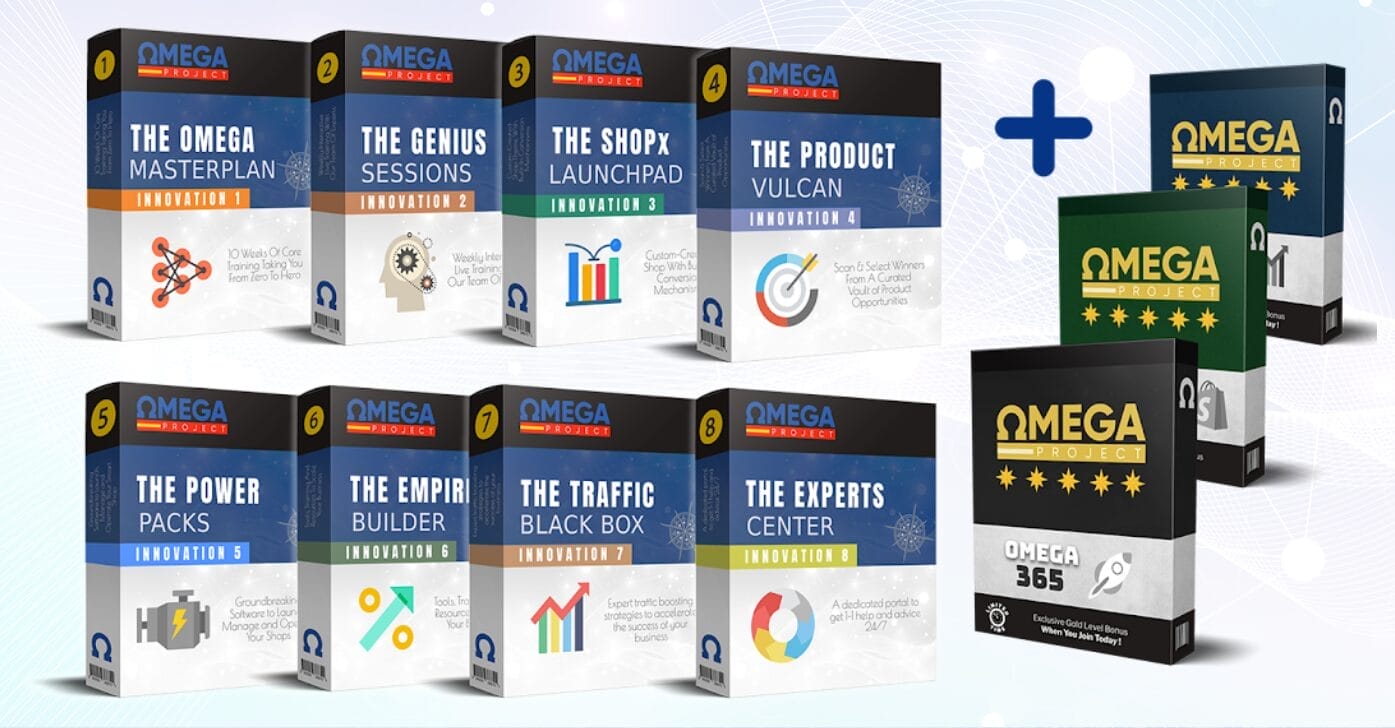
INNOVATION 1: THE OMEGA MASTERPLAN
The core 10-week blueprint revealing how to start and scale the system. 100+ videos, strategy manuals, process maps and more!
INNOVATION 2: THE GENIUS SESSIONS
Live ‘Mastermind’ style training sessions on Zoom, 2–3 times a week. Milestone checkpoints, live interaction and comprehensive Q&A sessions.
INNOVATION 3: THE SHOP X LAUNCHPAD
The custom-created shop with built-in conversion mechanisms. Preloaded with everything you need to minimize the guesswork!
INNOVATION 4: THE PRODUCT VULCAN
Save days, even weeks of work by quickly identifying high-demand products, then sucking them directly into your shop in order to start selling ASAP.
INNOVATION 5: THE POWER PACKS
Groundbreaking resources to help launch your shop and maximize your sales. Domain solutions, the logo builder, other apps and tools — and so much more!
INNOVATION 6: THE EMPIRE BUILDER
Dedicated training, tools and resources specifically designed to help you scale your business quickly, effectively and efficiently.
INNOVATION 7: THE TRAFFIC BLACK BOX
Free and paid strategies to diversify your traffic streams and explode your reach BEYOND shopping platforms (into YouTube, Facebook, Instagram and more!).
INNOVATION 8: THE EXPERTS CENTER
A dedicated support portal with multiple avenues of assistance so you can ask questions and get help from our experts.
BONUS #1: OMEGA ONE
Step-by-step training to create high-converting, 1-page product landing pages to boost the sales of your best-selling products.
BONUS #2: OMEGA 365
Full mentorship throughout the whole of 2025 to guide your growth, keep you on track and help you scale.
BONUS #3: OMEGA MIND
70 exclusive videos to help transform your mind and gain the “millionaire mindset” advantage.
What Will You Learn?
- How to launch a conversion-optimized e-commerce shop using the pre-built Shop X Launchpad system with minimal technical setup
- How to identify and import high-demand products rapidly using the Product Vulcan research framework to accelerate time-to-revenue
- How to diversify traffic streams using free and paid strategies across YouTube, Facebook, Instagram, and beyond shopping platforms
- How to build high-converting one-page product landing pages using the Omega One bonus framework to boost AOV and conversion rates
- How to scale operations efficiently using the Empire Builder module for systems, team delegation, and profit reinvestment
- How to maintain execution momentum through live mastermind sessions, expert support, and mindset training via Omega Mind
Course Content
01 Start Here
-
01 How The Training Will Work
05:47
03 Office Hours
-
01 February 3 Office Hours
01:01:37 -
02 February 8 Office Hours
01:48:17 -
03 February 10 Office Hours
55:45 -
04 February 14 Office Hours
02:07:29 -
05 February 17 Office Hours
59:23 -
05 Improving Your Product Search Results In Vulcan
01:03 -
06 February 21 Office Hours
01:55:50 -
07 February 24 Office Hours
58:26 -
08 February 28 Office Hours
01:00:48 -
09 March 4 Office Hours
01:02:17 -
10 March 7 Office Hours
01:20:20 -
11 March 11 Office Hours
01:57:12 -
12 March 17 Office Hours
55:31 -
13 March 18 Office Hours
01:04:19 -
14 March 24 Office Hours
59:46 -
15 March 25 Office Hours
01:02:14 -
16 March 27 Office Hours
01:06:24 -
17 March 31 Office Hours
57:50 -
18 April 9 Office Hours
01:06:11 -
19 April 14 Office Hours
01:04:18 -
20 April 22 Office Hours
01:09:12 -
21 April 28 Office Hours
01:06:02 -
22 May 5 Office Hours
48:26 -
23 May 26 Office Hours
57:32 -
24 June 2 Office Hours
01:08:49 -
25 June 9 Office Hours
41:59 -
26 June 23 Office Hours
38:03 -
27 June 30 Office Hours
51:37 -
28 July 7 Office Hours
01:01:41 -
29 July 21 Office Hours
37:09
04 Special Live Sessions
-
01 February 27 Finding Products
01:37:27 -
02 March 13 Google Merchant Center
01:25:24
05 Intro Overview
-
01 Early Bird Webinar
01:17:06 -
02 What Is Dropshipping
03:44 -
03 Omega Strategy
03:01 -
04 Expectations Timeline
04:04 -
05 Meet The Team
03:33 -
06 Tools Software
02:36 -
07 Vulcan Sneak Peak
06:26
06 Module 1 Getting Started
-
01 Module 1 Webinar
01:27:23 -
03 1 Picking A Target Country
05:00 -
04 2 Niche Selection
10:10 -
05 3 Selecting A Business Store Name
09:15 -
06 4 Register Store Domain Name
07:31 -
07 5 Create Store Email Address
07:22 -
08 6 Setup Store Phone Number
03:29 -
09 7 Setup Store Business Address
03:24 -
10 8 Setup Your Shopify Store
03:32 -
11 9 Shopify Overview
05:24 -
12 10 Connect Domain To Shopify
04:28 -
13 11 Other Shopify Settings
14:49 -
14 12 Shopify Payments Setup
05:41 -
15 13 Install Omega Shopify Theme
03:19
07 Module 2 Store Setup
-
01 Module 2 Webinar
01:04:01 -
03 1 Store Setup Overview
02:14 -
04 2 Store Policy Pages
08:10 -
05 3 Customer Help FAQ Page
04:10 -
06 4 Contact Us Page
03:48 -
07 5 About Us Page
06:44 -
08 6 Create A Store Logo
14:54 -
09 7 Store Headers Footers
09:14 -
10 8 Home Page Setup
07:23 -
11 9 Order Tracking
06:43 -
12 10 Product Page
05:14 -
13 11 Going Live With Your Store
01:42 -
14 12 Vulcan Introduction
09:18 -
15 13 Setup Vulcan With Shopify
03:04 -
16 14 Product Research With Vulcan
12:58 -
16 Improving Your Product Search Results In Vulcan
01:03 -
17 15 Add Products To Shopify With Vulcan
09:23 -
18 16 Create An AliExpress Account
02:31 -
19 17 Create A CJ Dropshipping Account
04:47 -
20 18 Understanding The Numbers
05:52 -
21 19 Allow Google To View Your Store
02:42
08 Module 3 Google Account
-
01 Module 3 Webinar
01:05:20 -
03 01 GMC Overview
06:17 -
04 02 Creating A GMC Account
04:28 -
05 03 GMC Setup
08:12 -
06 04 GMC Checklist
04:22 -
07 05 GMC Checklist General Navigation
10:54 -
08 06 GMC Checklist Contact Us About Us Privacy Shipping
05:12 -
09 07 GMC Checklist Home Page Returns TC And Checkout
08:12 -
10 08 GMC Checklist Footer Shopify Product Settings
08:36 -
11 09 Adding First Product To GMC
06:41 -
12 10 Installing Simprosys
07:12 -
13 11 Google Ads Overview
05:52 -
14 12 Creating A Google Ads Account
07:51 -
15 13 Tracking And Conversion Data Setup
09:55 -
16 14 Create Google Shopping Campaign
09:09 -
17 15 Dealing With GMC Policy Issues
03:59 -
18 16 Deleting A GMC Account
06:10
09 Module 4 Google Ads
-
01 Module 4 Webinar
48:09 -
03 1 Google Ad Column Setup
10:22 -
04 2 Google Ads Shopping Strategy
06:42 -
05 3 Google Ads Shopping The Traffic Light System
05:04 -
06 4 Google Ads Shopping Checklist
08:31 -
07 5 Google Ads Shopping Product Segmentation
06:16 -
08 6 Processing Orders
05:34 -
09 7 Customer Tracking Sheet
07:19 -
10 8 Customer Service Top 10 Golden Rules
05:25 -
11 9 Returns Refunds Chargebacks
08:00
10 Module 5 Microsoft Ads
-
01 Module 5 Webinar
01:17:02 -
02 01 Microsoft Ads Overview
04:33 -
03 02 Creating A Microsoft Ads Account
04:48 -
04 03 Verify Site With MS Webmaster Tools
04:41 -
05 04 Microsoft Ads Merchant Center
03:54 -
06 05 Microsoft Ads Shopping Feed Setup
03:20 -
07 06 Create Microsoft Ads Shopping Campaign
07:19 -
08 07 Microsoft Ad Colums
05:41 -
09 08 Microsoft Ads Shopping Strategy
04:09 -
10 09 Navigating Microsoft Ads
05:10
11 Module 6 Facebook Ads
-
01 Module 6 Webinar
29:13 -
02 01 Facebook Ads Overview
04:12 -
03 02 Creating A Facebook Business Manager Account
06:20 -
04 03 Creating A Facebook Business Page
06:19 -
05 04 Creating A Facebook Ad Account
02:50 -
06 05 Creating A Facebook Pixel
01:39 -
07 06 Connecting Facebook To Shopify
04:15 -
08 07 Creating An Instagram Account
05:33 -
09 08 Creating A Facebook Ads Campaign
10:55 -
10 09 Facebook Ad Columns
05:43 -
11 10 Facebook Ads Strategy
05:56
12 Module 7 Remarketing Misc
-
01 Module 7 Webinar
42:43 -
02 01 What Is Remarketing
03:13 -
03 02 Google Remarketing
08:30 -
04 03 Microsoft Remarketing
07:33 -
05 04 Facebook Remarketing
06:20 -
06 05 Customizing Customer Emails
07:25 -
07 06 Setting Featured Images In Search
03:46 -
08 07 Update ShopX Theme
07:56 -
09 08 Google Product Image Requirements
04:26 -
10 09 Adding Badges On Product Pages
05:25 -
11 10 Customer Reviews
07:52
13 Module 8 The Power Of Email
-
01 Module 8 Webinar
01:33:00 -
02 01 Creating A SendPad Account
02:25 -
03 02 Connect SendPad To Shopify
05:02 -
04 03 Connect Your Domain To SendPad
06:59 -
05 04 Navigating SendPad
15:07
14 Module 9 Effective Daily Operations
-
01 Module 9 Webinar
01:08:03
15 Module 10 Building Your Ecommerce Empire
-
01 Module 10 Webinar
01:06:01
16 Module 11 Virtual Assistants Outsourcing
-
01 Module 11 Webinar
01:14:23
17 Module 12 Latest Updates
-
01 Module 12 Webinar
38:20
18 Module 13 Google Search Strategy
-
01 Module 13 Webinar
40:57 -
02 01 Google Search Strategy
05:04 -
03 02 Selecting Products
04:04 -
04 03 Ad Headlines Descriptions
07:02 -
05 04 Keywords
07:17 -
06 05 Creating A Search Campaign
08:56 -
07 06 Optimizing Keywords
10:43 -
08 07 Other Optimizations
05:08 -
09 08 Advertorial Setup
02:41 -
10 09 Advertorial The Copy
06:03 -
11 Advertorial Creating The Page
10:52 -
12 11 Advertorial Creating The Ad
05:32
19 Module 14 Advertorials
-
01 Module 14 Webinar
42:22
20 Module 15 Q4 Updates
-
01 Module 15 Webinar
30:19
21 Support
-
02 Sending Support A Loom Video
02:27
Update 1 03 Office Hours
-
30 August 4 Office Hours
34:23
Update 1 24 Module 16 Pinterest
-
01 Module 16 Webinar
27:55 -
02 01 Pinterest Overview
06:06 -
03 02 Pinterest Trends
04:26 -
04 03 Creating A Pinterest Account
05:16 -
05 04 Connecting Simprosys To Pinterest
04:18 -
06 05 Pinterest Ad Campaign
08:59
Download Full Course Resources
-
Download Below
Student Ratings & Reviews